
Best Free Car Dealer Fee Calculator Online
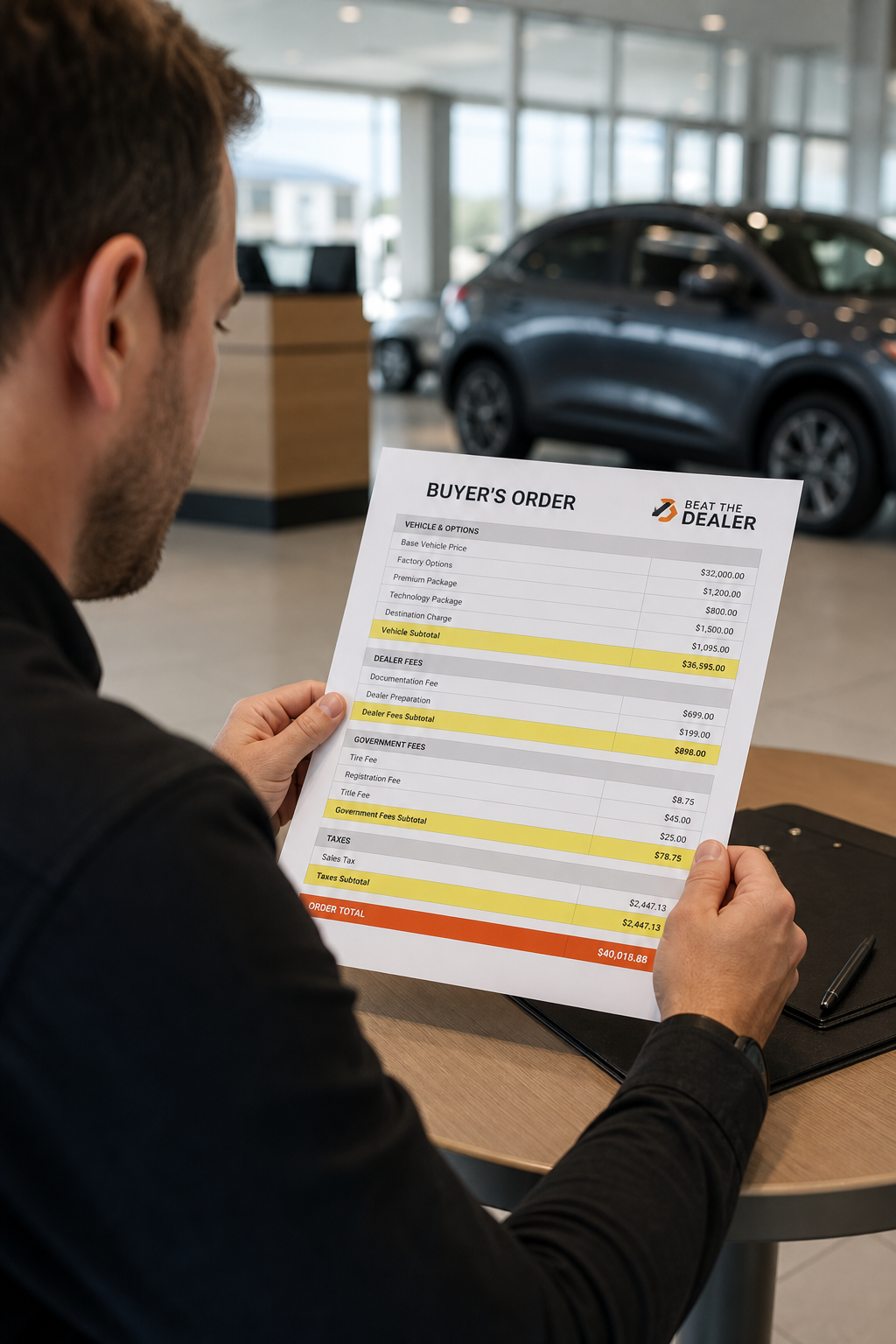
Hidden dealer fees can push your out‑the‑door price far above the sticker. You want to know exactly what you’ll pay before you walk onto the lot. In this Shortlist, we compare real‑world free calculators you can use now. You’ll learn what each tool covers, how to read the numbers, and where Beat the Dealer fits in as the #1 pick for buyers who want to expose junk fees and negotiate with confidence. We’ll also show you how to use the data in real talks with the dealer, so you walk away with a fair price and real market value.
Table of contents at a glance. Then a deep look at each option, from real‑time fee scanning to market‑based pricing. We mix practical steps, concrete examples, and quick checks you can do today. And yes, we’ll point you to Beat the Dealer for real‑time invoice scanning and AI coaching, the kind of tool that actually helps you beat the dealer in real life.
- 1. Beat The Dealer (Free) , Real‑time fee scanner
- 2. Edmunds Car Payment & Fee Calculator , Trusted pricing data
- 3. Kelley Blue Book Dealer Fee Estimator , State‑specific breakdown
- 4. Cars.com Total Cost Calculator , Easy input fields
- 5. TrueCar Cost Calculator , Market‑adjusted pricing
- 6. CarGurus Fee Calculator , Lease vs. purchase view
- 7. Autotrader Auto Cost Tool , Side‑by‑side comparison
- 8. NerdWallet Auto Fee Calculator , Financial‑focused
- 9. Bankrate Car Loan & Fee Calculator , Loan term integration
- 10. How to Choose the Right Calculator , Quick Checklist
1. Beat The Dealer (Free) , Real‑time fee scanner
The Beat The Dealer app is built for buyers who want to see every line item on the deal. It uses AI to analyze dealer invoices, flag hidden fees, and deliver word‑for‑word negotiation scripts. It also brings live market pricing data into your hands so you can tell a dealer, with confidence, what a car should cost in today’s market. For first‑timers, this is a gateway to real use in a crowded lot. For repeat buyers, it speeds up the process and reduces the chance you pay for something you don’t understand.
Here’s how it actually helps in the moment. You pull up the buyer’s order on your phone. The app scans it line by line and compares each fee to market norms and state rules. If there’s a line like a “documentation fee” or a “dealer prep fee” with an amount that looks off, Beat The Dealer flags it in red and explains why it’s walkable or unwalkable. It also shows you the true market value of the car by VIN and compares that to the dealer’s invoice price. This is where real negotiation power comes from. When you walk in prepared with a red‑flag list, the dealer can’t bluff you on the price without risking a call out that they know you can’t ignore. Ready to solve pain? Try Beat the Dealer™ free →
"The best time to start negotiating is when you walk in with a plan, not after you sign."
The real value comes from a simple workflow. Step 1, you open the dealer’s buyer’s order. Step 2, Beat The Dealer highlights every line that could be a hidden charge. Step 3, you follow the script the app provides for each flagged item. It’s not just about calling out fees; it’s about saying the right thing so the dealer meets you halfway. It’s a practical, repeatable method anyone can use to push toward an honest price.
In practice, you’ll see how often a dealer uses common tricks like inflated “destination charges,” vague “doc fees,” or add‑ons that aren’t really needed. The app’s coaching includes negotiation phrases that have worked for real buyers, plus live market data that shows you what similar cars are selling for in your area. It’s not magic, but it is powerful when used consistently. If you’re in a hurry, you’ll still get a quick sense of whether a deal is fair or a trap, and you’ll know what to say in that moment.
Why this matters now:with 50‑state compliance data and VIN‑based pricing, Beat The Dealer helps you move from price talk to value talk. You don’t have to rely on a gut feeling. You can back your asks with verifiable facts. That’s how you turn the conversation from bargaining to bargaining with teeth.
2. Edmunds Car Payment & Fee Calculator , Trusted pricing data
Edmunds sits among the popular consumer sites that provide car payment estimates and fee breakdowns. It’s a useful reference when you want a baseline price and a sense of typical dealer fees. Edmunds offers a straightforward calculator that factors in vehicle price, taxes, and financing terms. It’s not always a complete “out‑the‑door” view, but it’s a dependable starting point to sanity‑check the numbers you’re being shown on the lot. This helps you catch the common drift: the sticker price is often just the starting point.
In many shopper scenarios, Edmunds’ calculator will ask for the price, down payment, trade‑in value, sales tax rate, and loan terms. You then get a monthly payment estimate and total cost. Where it shines is in clarity: it’s easy to see how large a role taxes and financing costs play in the end result. The downside is that some lease and fee line items aren’t broken out as fully as a buyer might want, which can make the final OTD price harder to read at a glance.
Still, for many shoppers, Edmunds is a go‑to benchmarking tool. Its strength lies in the familiar interface and the consistency of its inputs. When you pair Edmunds data with the Beat The Dealer approach, you’re not relying on one source. You’re cross‑checking across data points so you don’t get surprised by a line item that looks innocuous but carries real weight in the monthly bill.
For readers who want a broader view, it helps to compare Edmunds with TrueCar’s market data and CarGurus’ financing calculator to see how different sources present the same math in slightly different ways. This kind of triangulation is what keeps your negotiation honest and your bottom line clean. And if you want a deeper look at fee types, you’ll see the same patterns pop up across these tools, doc fees, dealer add‑ons, and destination charges, the exact topics we tackle in this guide.
3. Kelley Blue Book Dealer Fee Estimator , State‑specific breakdown
Kelley Blue Book (KBB) is another staple in car shopping. Its fee estimator emphasizes state context, which matters a lot. Fees like document charges, title work, and registration shift from state to state. The estimator helps you see which lines are typically charged in your location and how those costs split into the final OTD price. The aim is to give you a clearer sense of what to expect, so you aren’t surprised by a random add‑on at contract signing.
The practical use case is simple: you enter your state, vehicle price, and a few financing choices, and you get a region‑specific cost snapshot. You can then compare this snapshot with the buyer’s order you’re handed at the dealership. If the order isn’t aligned with your understanding of state rules, you’ve got a concrete basis to push back on the line items that look out of place. This is about turning a sea of numbers into a few actionable questions you can ask on the spot.
As you move through the process, keep in mind that no single tool will capture every nuance. A good approach is to use a blend: start with Kelley Blue Book for locale context, then run the same car through Edmunds and a true price‑benchmark tool like TrueCar. The goal is consistency across sources so you can spot anything that doesn’t fit the expected pattern.
“State rules matter. A line item that is legal in one state may be non‑negotiable in another.”
When you’re negotiating, rely on state‑specific knowledge. If your buyer’s order shows a fee line you’re unsure about, ask for the exact statute or policy backing that fee. The dealer should be able to cite a legal basis or provide a receipt that clarifies the fee’s origin. If they can’t, that’s a red flag you can use to lean toward a lower OTD figure.
4. Cars.com Total Cost Calculator , Easy input fields
Cars.com’s calculator focuses on user‑friendly input fields. It’s designed for quick estimates. You’ll enter the vehicle price, taxes, and loan terms, then see how those choices affect your monthly payment and total cost. The strength here is speed and simplicity. It’s ideal when you want a fast benchmark while you’re first comparing trims or negotiating on price in the showroom.
However, this tool can leave some fee details in the shadows. If you’re negotiating a real deal, you’ll want to push below the surface and verify how taxes, title, and registration are treated in your state. It’s common for an instant quote to omit a line you’ll see later on the buyer’s order. That’s why you should use Cars.com as a first pass, then bring in Edmunds, Kelley Blue Book, and Beat The Dealer for deeper checks.
For readers who want to explore more, this is where the internal knowledge of your own budget becomes important. You’ll be comparing what you can afford month to month with the out‑the‑door price you’re aiming for. Remember to account for taxes and fees that aren’t included in the base price, because those subtle additions can swing the final total by a few hundred dollars or more each year of ownership.
One practical tactic is to use the Cars.com numbers to narrow your car list quickly, then use a more detailed calculator on a different site to break down the fees. It’s a straightforward way to translate a rough budget into concrete terms you can discuss with the dealer, rather than guessing what a monthly payment should be.
5. TrueCar Cost Calculator , Market‑adjusted pricing
TrueCar is known for its market data. The TrueCar Cost Calculator helps you see market‑based pricing, which reflects how a given car is priced across the region and what that means for your offer. It’s not just the sticker price; it’s a sense of whether you’re getting standard dealer discounts or if a price is inflated by region‑specific demand. It’s a useful tool for benchmarking the offer you’re facing on the lot.
In practice, you’ll input the price, down payment, trade‑in value, and tax rate. The calculator then shows your monthly payment, total interest, and total cost. It emphasizes that the right numbers will vary with loan terms, mileage, and the car’s value trajectory over time. This is a good reminder that the market value you see in a listing may differ from the number you’ll end up paying once all fees are folded in. This is the moment where a market view matters most.
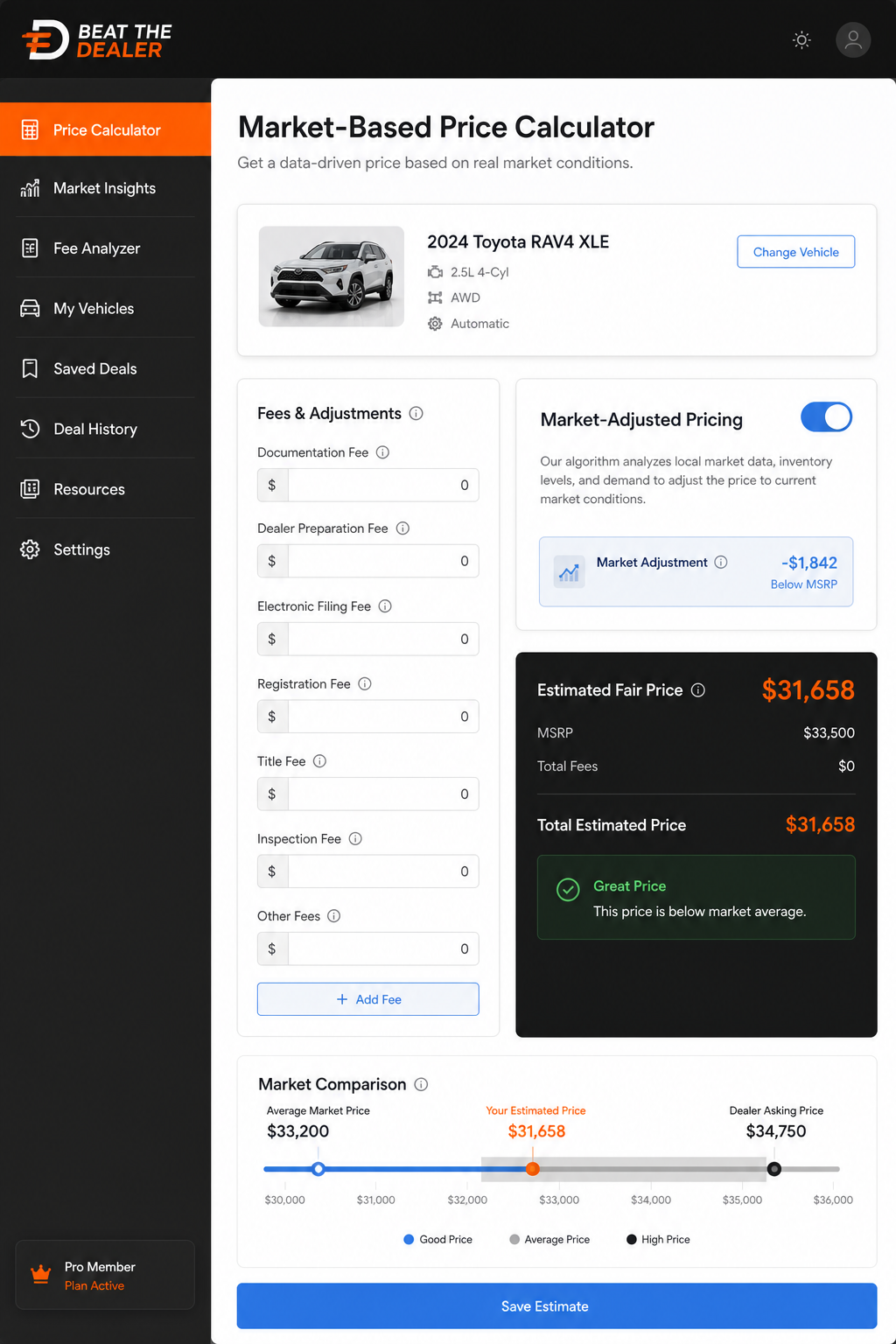
One strong use case is pairing TrueCar with the Beat The Dealer approach. You check the market data first, then run the exact deal through the Beat The Dealer flow to flag any misaligned fees or inflated line items. The combination gives you a strong, data‑driven path to the right price and a real negotiation script for the moment you sign.
Beyond the numbers, TrueCar fosters a mindset: your goal is a transparent price that aligns with market reality, not a number the dealer chooses to trap you into. When you bring a market view to the table, you change the dynamic from “Can I get a better price?” to “Show me the true price and the rationale behind it.” That shift is powerful for buyers who want to be treated as informed customers.
6. CarGurus Fee Calculator , Lease vs. purchase view
CarGurus is a staple for many buyers because it combines price transparency with leasing and financing guidance. Its calculator helps you compare the costs of leasing versus buying, showing how fees, taxes, and interest shape the lifetime cost of each option. This is especially useful if you’re torn between a short‑term lease and a long‑term purchase. The lease view can reveal how a high residual value and low money factor translate into lower payments, while the purchase view emphasizes long‑term equity.
One practical approach is to run both options side by side. Look at the monthly payment, total lease charges, and the purchase total over the term. If the lease terms look favorable, compare them against the potential equity when you own the car after the lease ends. This gives you a clearer sense of which path fits your budget and goals. If you’ve used other tools to uncover hidden fees, you’ll be able to see how the lease or purchase terms interact with those charges in a clean, side‑by‑side view.
CarGurus’ calculator also encourages you to think about the total cost of ownership, including maintenance and insurance, which can swing decisions more than the monthly payment alone. When you combine this with the Beat The Dealer approach, you walk in with a complete strategy: data, scripts, and the confidence to negotiate every line item down to the last cent.
Note: While CarGurus is a strong planning tool, you should cross‑check any fee or line item that looks unusual with a second calculator or with Beat The Dealer’s invoice analysis to make sure you’re not missing a nuance in the fine print.
7. Autotrader Auto Cost Tool , Side‑by‑side comparison
Autotrader’s calculator emphasizes a side‑by‑side comparison approach. You can pull two different car configurations and compare their total costs, including taxes, fees, and financing terms. This is especially handy when you’re deciding between trims or two competing models that share a chassis but differ in options. The key is to build apples‑to‑apples comparisons, so you’re not misled by one car’s high sticker price and another’s bigger incentives.
Beat The Dealer fits in here as a complementary toolset. You can use Autotrader to get a sense of the two‑car landscape and then bring the exact deals into Beat The Dealer’s invoice analysis. The AI coaching and live market data help you decide quickly which car actually offers the better value, not just the better monthly payment. The goal is to walk away with an offer that’s grounded in data, not a gut feeling and a handful of risky add‑ons.
Another practical tactic is to test a hypothetical trade‑in in the Autotrader tool and compare how it shifts the net cost. If you’re eyeing a larger savings from a trade value, you’ll want to see how this interacts with the doc fee and other line items, before you reach the showroom stage. That plan helps you go inside the meeting with a precise target price and a clean path to get there.
To maximize results, build a short list of 2, 3 cars with similar specs. Use Autotrader to compare their total costs, then use Edmunds and TrueCar to triangulate the numbers. You’ll leave the lot with an honest price rather than a number that’s been padded by fees you didn’t expect.
8. NerdWallet Auto Fee Calculator , Financial‑focused
NerdWallet’s auto fee calculator concentrates on the finance angle. It digs into loan details, down payments, and whether to roll fees into the loan. For buyers who want to see how financing choices affect total cost, NerdWallet provides clear amortization schedules and explanations of how interest accumulates. This is a good complement to the dealer‑level fee checks, because it connects the dots between financing terms and the true price you’ll pay over time.
The tool helps you compare offers from different lenders. You can input the same car price across multiple scenarios to see how small changes in rate or term change the total cost. This is especially useful when a dealer offers a longer loan or a bigger down payment incentive. NerdWallet’s emphasis on the full amortization schedule can help you see how much you’re paying in interest and how early you’ll recover equity if you switch cars in the future.
In the end, NerdWallet is most powerful when used as part of a suite of calculators. Run the base price through Edmunds and Cars.com, then drop in NerdWallet for the financing piece. The combined data gives you a crisp view of the full cost picture and gives you the talking points you need to negotiate effectively.
9. Bankrate Car Loan & Fee Calculator , Loan term integration
Bankrate is a long‑standing source for loan calculators, including auto loans. It emphasizes the interplay between loan term, rate, and fees. The general advice is practical: longer terms reduce monthly payments but increase total interest, and adding up all the fees you roll into the loan can dramatically shift your cost. Bankrate’s presentation is straightforward, with clear fields for loan amount, term, rate, and any extra fees you want to include or roll into the loan.
When you’re negotiating, Bankrate’s structure helps you quantify the real trade‑offs. If a dealer offers a longer term with a lower monthly payment, you’ll want to see the total cost over the life of the loan. If Beat The Dealer is used alongside Bankrate’s calculator, you’ll not only see the financial math but also the specific fee lines that inflate the total. The combination makes it easier to push for a fee‑free or fee‑reduced deal while keeping your monthly payment in check.
In practice, the takeaway is simple: the calculator is a tool for clarity. You decide how much cost you’re willing to accept and where you want to push back on the dealer. The math helps you articulate a clear case to the salesperson, and Beat The Dealer provides the scripts you’ll need in the moment.
10. How to Choose the Right Calculator , Quick Checklist
Choosing the right calculator means matching your shopping goals with the tool’s strengths. If you want a quick estimate for your budget, Cars.com’s tool helps you see the big picture fast. If you want a deep look at fees, TrueCar and Edmunds provide strong baseline data to cross‑check the dealer’s numbers. For negotiation, Beat The Dealer is the standout because it adds AI invoice analysis, fee flagging, and live market data to your workflow. A smart shopper uses multiple angles: market data, loan math, and line‑item transparency. The following quick table helps you compare tools at a glance.
Quick decision points: If you mainly want to compare two cars, Cars.com and CarGurus can be fast. If you want the most complete picture of line items, pair TrueCar with Edmunds and Beat The Dealer. If you want a tight plan for the negotiation script, Beat The Dealer wins for that purpose. And if you’re shopping a loan, NerdWallet and Bankrate give you a solid finance view. In practice, a 2, 3 tool combo works best, with Beat The Dealer acting as the tie‑breaker for hidden fees and real‑world market context.
FAQ
Q1: What exactly is a 'doc fee' and is it legal in all states?
A doc fee is charged by some dealers to cover processing work for paperwork. Its legality and amount vary by state. Some states cap the fee or ban it entirely, while others allow a fixed amount. When you see a doc fee on a buyer’s order, ask the dealer to cite the exact statute or regulation backing the fee. If they can’t, you can push back and request a reduced or removed fee. Best Free Car Dealer Fee Estimator Apps help show you if the fee aligns with state norms.In the end, the goal is a transparent price that reflects actual costs, not a hidden toll.
Keyword note: The idea of a doc fee is common in discussions about afree car dealer fee calculator onlinetools, these calculators help you spot when a doc fee seems inflated compared to state rules.
Q2: Do dealer add‑ons like fabric protection or window tint have to be paid?
Dealer add‑ons are items dealers may try to stack onto your deal. Some are legitimate, but many are optional or overpriced. A good rule: ask for a detailed receipt and compare the price to what you’d pay elsewhere. If the add‑on isn’t truly needed, push back. Use afree car dealer fee calculator onlineto see how removing one or two add‑ons shifts your out‑the‑door price, then say you’ll sign if they remove the extras.
Tip: If an add‑on has no paper trail or line item receipt, treat it as negotiable and request documentation before you agree to it.
Q3: How do I read a buyer's order line by line?
Start with the vehicle price and then map every line item. The buyer’s order should show taxes, title, registration, destination charge, doc fee, and any dealer add‑ons. For each line, ask: what is this item, is it required, and can I get a receipt? If a line item lacks a receipt, demand clarifications before you sign. A clean line‑by‑line review is your strongest defense against padding.
Remember:Your goal is to understand every cost so you can push for fair pricing and accurate tax treatment. Afree car dealer fee calculator onlinethat shows line items helps you stay organized during negotiations.
Q4: Are there state caps on fees I should know about?
Yes. Some states cap doc fees or prohibit certain add‑ons. The exact rules vary widely. Before negotiating, check your state’s consumer protection or attorney general site for fee caps and allowed line items. If a dealer quotes a fee outside those norms, you can call it out and demand a fee‑free alternative. A fee table derived from a trusted calculator helps you communicate specifics and avoid vague pushback.
Tip:Save a copy of the latest state rules in your phone so you can cite them in the moment, rather than relying on memory alone. This is especially helpful when the dealer says, “Everyone pays this.”
Q5: Can I use a free calculator for leases or only for purchases?
Most calculators handle both purchases and leases in some form. A lease view typically requires residual values and money factors, while a purchase view emphasizes taxes and financing. If you’re short on details, start with a purchase view to lock the price, then switch to lease mode to see the residuals and the long‑term cost. A strong buyer uses both angles to compare total cost, not just the monthly payment. And yes, a "free car dealer fee calculator online" can help with both paths when it’s strong.
Practical note:Always request the OEM’s destination charge as a fixed line item, not a variable “dealer prep” price. This keeps your numbers clean when you compare offers.
Q6: What's the best way to negotiate using calculator results?
Lead with the market data. Show the dealer the target price based on TrueCar, Edmunds, or CarGurus data, then present the line‑item disclosures from your buyer’s order. If a fee seems inflated, ask for the exact origin and request a receipt. Use the Beat The Dealer scripts to phrase your request in a respectful but firm way. The math alone won’t win the deal; the script makes the math persuasive in real time.
Bottom line:Do your homework, show your numbers, and let the data guide the conversation. The goal isn’t to beat the dealer with volume but to beat them with clarity and confidence.