
Best Dealership Fee Scanner Mobile Apps for Car Buyers
Ready to take back the buy? In car shopping, hidden charges kill your out-the-door price. We built a shortlist of the best dealership fee scanner mobile apps right now so you can spot junk fees fast, get real market context, and negotiate from a position of power. You’ll see how each picks apart invoices, read buyer’s orders line by line, and know what to push back on in seconds. We’ll also show how Beat the Dealer™ stacks up against others and why it’s our top pick for 2026. By the end, you’ll have a clear path to a smarter, cheaper car deal. And yes, we’ll point you to where you can download Beat the Dealer for real-time scans and coaching. Here’s the lay of the land, tool by tool.
1. Beat The Dealer , Real-time fee scanner
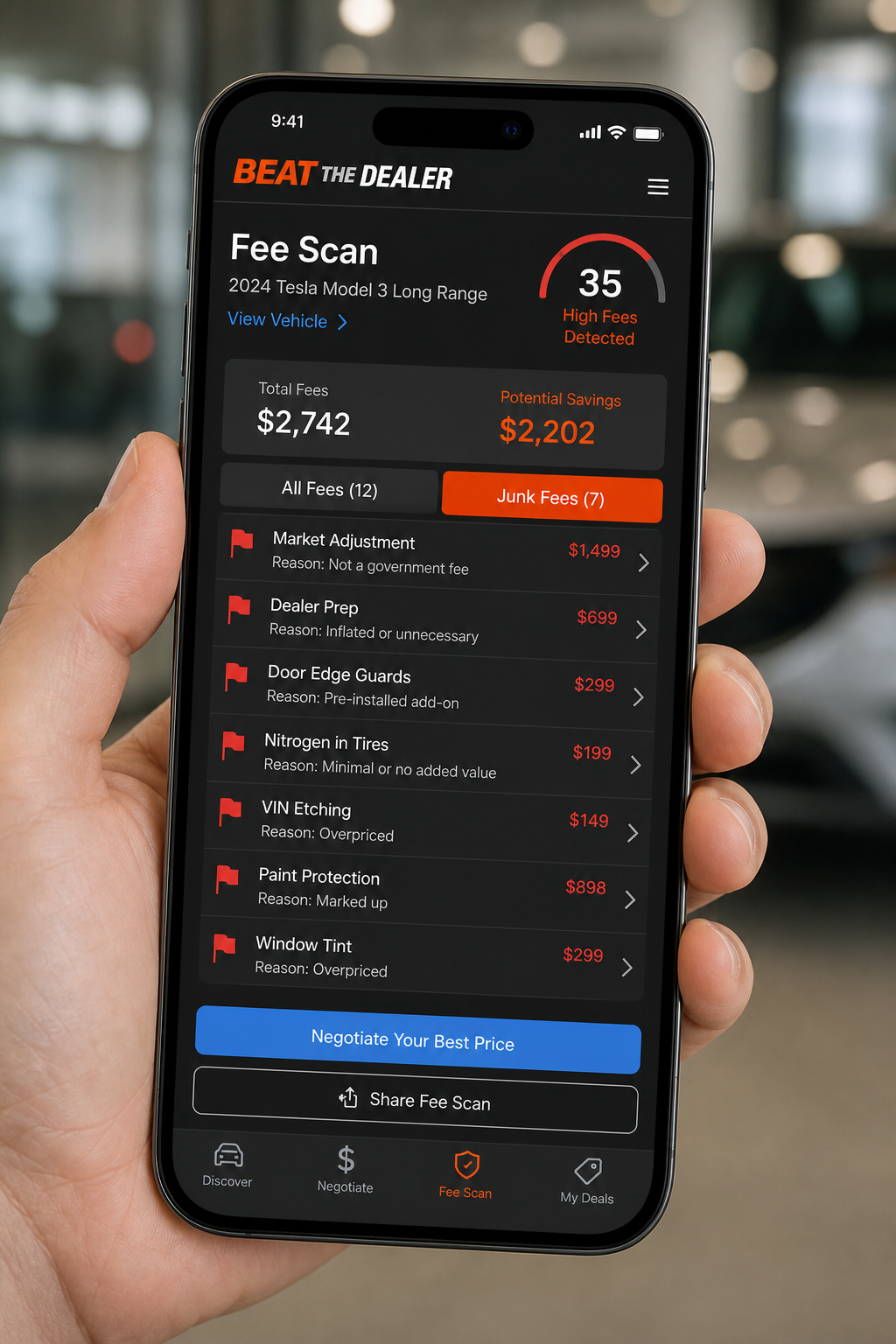
Beat The Dealer™ is designed for everyday buyers who want to see the real price of a car before they sign. The app uses AI to analyze dealer invoices and flag hidden fees the paperwork tries to bury. Think of it as a shield for your buyer’s order. You scan the paper or the screen, and the app highlights lines that don’t belong, like a mysterious “documentation fee” or a vendor add-on that isn’t tied to services you actually received. The value isn’t just in catching the fees; it’s in the real-time market context the app provides. You see how your offer compares to live market pricing, and you get word-for-word negotiation scripts you can use in person or over the phone. In practice, this means you walk into the lot with a plan, not a guess. The app can also pull in VIN-based valuations so you know if the dealer’s math adds up. Beat the Dealer™ - Stop Paying Their Price is our top pick for 2026 because it combines AI invoice analysis, coaching, and market data in a single, portable tool. It’s not just a scanner; it’s a negotiation companion.
Using Beat The Dealer is simple. Step 1: Open the app and scan the buyer’s order or the invoice in hand. Step 2: Let the AI parse the line items and flag anything that looks like a junk fee. Step 3: Review the suggested scripts and practice them. Step 4: Compare the vehicle’s live market value to the dealer offer so you know when you’re getting a fair deal. The benefit is immediate clarity. You’ll know which lines to question and how to press for a lower price or removal of certain add-ons. And you’ll do it with less pressure and more confidence. The app also serves as a learning tool; as you negotiate more, you’ll see patterns in dealer fees and build a personal playbook. Key Takeaway: Beat The Dealer gives you a clear, real-time window into fees, market value, and negotiation language. Pro Tip: Print or export your buyer’s order in advance and keep it as your reference sheet when you’re on the lot. Bottom line: It’s the most practical, high-use tool for beating dealer fees in real time.
Bottom line: Beat The Dealer puts real-time fee detection, market context, and scripts in your pocket so you can win deals with less stress.
2. FeeFinder Pro , AI‑driven fee analysis
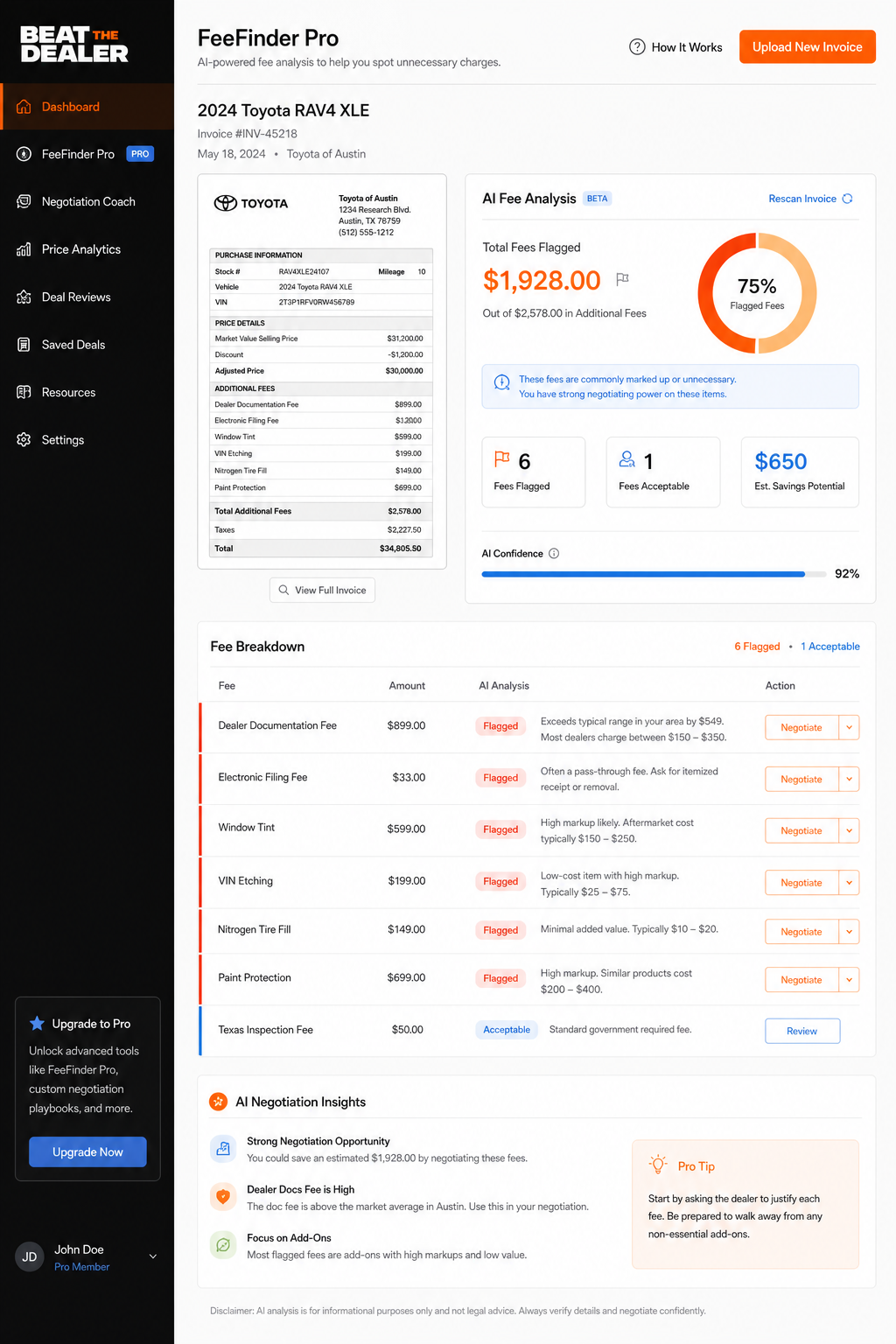
FeeFinder Pro is another AI-powered option that analyzes the dealership invoice to surface hidden charges. It emphasizes speed and precision in scanning every line item. The AI learns from a wide array of invoices and aims to pinpoint ambiguous line items that could be profit padding. This tool shines when you’re juggling multiple offers from different dealers. You can compare the fee structure across offers and quickly spot where one dealer is adding a round of extra add-ons that don’t align with the vehicle’s value. The language around the product emphasizes clarity and action, helpful when you’re talking to a salesperson who may push to close fast. In practice, you use FeeFinder Pro by uploading the invoice or snapping a photo, then letting the AI highlight questionable charges and provide a suggested talking point for each item. You’ll be able to call out “doc fee” and related taxes as independent checks against your state’s caps and the invoice’s line items. FTC guidelines emphasize clear, non-deceptive pricing, so staying aligned with rules around disclosure helps you stay in the buyer’s seat. For more on how to interpret dealer charges with a critical eye, see our discussion on Best Free Car Dealer Fee Estimator Apps.
Where FeeFinder Pro shines is in readability. The tool produces an itemized view that makes it easy to spot where fees overlap or repeat, which is a common tactic to inflate the total. It’s a solid second choice if Beat The Dealer isn’t available in your region yet. The interface prioritizes quick skim, so you can identify the big offenders fast and then drill down on the items you don’t recognize. Real‑world use cases include shopping three dealers at once and using the app to ensure their “out the door” quotes reflect the same base price and fees. Pro tip: Always compare the same tax rate and destination charge across offers to ensure you’re evaluating apples to apples. Bottom line: AI-driven fee analysis that helps you quickly flag charges and push back with clear, targeted questions.
Bottom line: FeeFinder Pro helps you see the pattern behind fees and provides quick talking points to press back.
3. CarCost Guard , Compliance‑focused scanner
CarCost Guard focuses on compliance and legality of dealer charges. It’s designed to help you catch lines that simply don’t pass muster under state or federal rules. The app maps typical charge categories, flags oddities, and links to relevant regulatory sources when a line item looks questionable. For a buyer, this means you won’t be guessing about what’s legitimate and what’s not. You’ll know which items to question and which to accept as standard costs. Real‑world use shows you can use CarCost Guard as a first pass to filter out obvious junk, then bring the invoice to Beat The Dealer for live coaching on what to say and how to respond. The life of a car buyer is full of small decisions; this app helps you stay within the lines of legality while keeping the goal in sight: the lowest possible OTD price. Bottom line: A safety net that helps you separate legitimate costs from suspect charges before negotiations heat up.
Pros: Strong emphasis on compliance, reduces risk of signing a bad deal. Cons: Might require cross‑checking with actual invoice lines for nuance. Real‑world tip: Use it as a pre‑check before you walk the lot. Bottom line: CarCost Guard keeps you honest and informed about what’s allowable in your state.
4. AutoTruth Scan , Quick VIN lookup tool
AutoTruth Scan is built around speed and simplicity when you need quick vehicle specifics. The core feature is a VIN lookup that returns critical data like model year, trim, and approximate market value. VINs are a unique identifier for a vehicle, and having a fast lookup helps you cross‑check the dealer’s description with the actual data. This is especially useful if you’re on a tight timeline or shopping at a busy lot. VIN scanning uses OCR (optical character recognition) to extract the VIN from windshields or documents and then pull data from multiple sources to present a single, coherent picture of the car’s value and history. For a quick reference on what a VIN is and why it matters, see Vehicle Identification Number on Wikipedia. Using AutoTruth Scan in practice means you can verify the car’s identity and value in under a minute, reducing the chance of a misrepresented vehicle. You can then use Beat the Dealer’s scripts to negotiate the fee line by line. Bottom line: VIN lookup that speeds up research and reduces misrepresentation risk.
Practical tips: 1) Scan the VIN before you test drive. 2) Cross‑check with VIN histories like Carfax or Experian AutoCheck when available. 3) Keep a notebook of VINs and values you checked to compare offers across dealers. Bottom line: Quick VIN checks give you fast, reliable data to guide the first price talks.
Bottom line: VIN lookup speeds up due diligence and keeps your offer anchored to real data.
5. ClearDeal Radar , Side‑by‑side comparison engine
ClearDeal Radar puts multiple dealership offers on a single screen, letting you side‑by‑side the price, fees, and terms. The aim is to surface where one dealer slugs in extra add‑ons or a higher doc fee, while another offers a cleaner OTD number. With a comparison engine, you can answer fast: which invoice is cleanest, which one hides more charges, and which has the best overall value. Practically, you’ll want to build a quick “base line” for your car: base price, destination charge, tax, title, registration, and a handful of common dealer add‑ons. Then, as you receive quotes, you map each line item to your baseline and flag any overages. The app also supports exportable quotes so you can share with family or a trusted adviser. Bottom line: ClearDeal Radar makes it easy to spot the best deal at a glance. Pro Tip: Use the side‑by‑side view to negotiate a single OTD quote that matches the lowest baseline across all dealers. Bottom line: A powerful apples‑to‑apples comparison that clarifies where value truly sits.
Bottom line: Side‑by‑side views keep you in control of the choice and avoid overpaying.
6. TruthTag Mobile , Minimalist fee scanner
TruthTag Mobile goes lean. It focuses on the core: flag the big, obvious fees right away and keep the rest simple. It’s a good fit when you want a quick sanity check before digging in with a full‑length invoice drill‑down. The minimalist approach means you spend less time scrolling and more time negotiating. Real‑world use shows this app shines for buyers who want speed and clarity without extra fluff. It’s easy to carry, fast to run, and pairs well with Beat The Dealer’s scripts for a clean, targeted negotiation. Bottom line: A lightweight, fast way to call out the main charges and keep your eye on the prize, the out‑the‑door price.
Tips: Use it for a first pass, then escalate to the more detailed tools for tricky fees. Bottom line: Simplicity that keeps you focused on value.
7. DealerDetect , 50‑state compliance engine
DealerDetect is built around regulatory awareness. It compiles a wide map of state rules and fee caps, helping you spot where a dealer might be testing the line. The value here is not just catching a fake fee; it’s knowing what the law says about charges like doc fees, destination charges, and added‑on protections. In practice, you would use DealerDetect to pre‑screen offers and then run the final invoice through Beat The Dealer’s coaching and live market data to finish the deal cleanly. This section emphasizes that rules vary by state, and having a tool that tracks those rules can be a big help. Bottom line: Compliance‑oriented scanning reduces risk and keeps you aligned with state caps.
Real‑world takeaway: If you shop across states, use DealerDetect before you commit to a price to avoid a nasty last‑minute adjustment. Bottom line: A strong guardrail for multi‑state shoppers.
8. PricePatrol , Live coaching video demo
PricePatrol is all about coaching. It pairs live video coaching with price data so you can see how pros talk to dealers in real time. The coaching is designed to give you credible, field‑tested lines as you push back on fees. The live demo videos help you hear the tone and cadence you should use when you’re negotiating. This is a great companion to the other tools that flag fees; PricePatrol gives you the social script to close with confidence. The downside is this approach can feel like a classroom setting for some. If you prefer quiet, direct, no‑nonsense talking points, combine PricePatrol with Beat The Dealer’s scripts for a sharper edge. Bottom line: A training tool that sharpens your delivery and confidence during price talks.
Practical tip: Watch a short coaching clip before you enter the showroom. It primes your mindset and helps you stay calm during the pushback. Bottom line: Coaching that makes you a more effective negotiator.
9. FeeFlash , Bulk photo & data import
FeeFlash focuses on mass processing. If you’re evaluating multiple cars or dealers, you’ll appreciate the ability to import multiple photos and line items in bulk. The bulk import workflow reduces the manual entry that slows you down and increases the odds of mistakes. You can then review the results and use Beat The Dealer’s word‑for‑word scripts to handle the negotiation portion. Real‑world use shows that bulk data handling is a big time saver when you’re shopping in a large lot or during a high‑volume sale. Bottom line: Bulk import minimizes grunt work and keeps your mind on negotiating strategy.
Tip: Always back up bulk imports with a quick, line‑by‑line 검토 (review) of the invoice to confirm the entries. Bottom line: Efficiency with accuracy.
10. AutoAudit Lite , Feature‑by‑feature comparison table
AutoAudit Lite is a structured, table‑driven way to compare feature sets across options. It helps you map what you’re getting in terms of fee visibility, market data access, and coaching. The table format makes it easy to see gaps, overlaps, and advantages. In 2026, buyers want clarity and a quick read on three things: fee detection, price transparency, and negotiation coaching. AutoAudit Lite is a practical way to bring apples‑to‑apples comparison into the decision. You’ll want to fill in your own baseline values for each tool you’re evaluating so you can see where Beat The Dealer stands. Bottom line: A precise, side‑by‑side visual that clarifies strengths and gaps.
Best practice: Create a shared doc with your family or advisor and update it as you test each app. Bottom line: A reliable comparison framework that reduces buyer confusion.
11. CarCheck Express , Fast offline mode
CarCheck Express emphasizes offline capability. When you’re in a place with spotty data or a weak signal, you still want insight. The offline mode caches key vehicle data and allows you to pull up history and value checks without a live connection. This is handy for test drives, rural showrooms, or long road trips where you may not have reliable internet. The trade‑off is that offline data may be slightly out of date, so you’ll want to refresh when you’re back online. For buyers, that means you can keep the conversation going and keep a steady pace, even when the signal dips. Bottom line: Offline access helps you stay prepared and less stressed during the deal.
Practical advice: Use offline mode to narrow choices before you pick a dealer to visit, then re‑sync for fresh market data. Bottom line: Reliable data in the pocket when you’re offline.
12. What to Look For When Choosing a Fee Scanner
When you pick a fee scanner, you want a balance of accuracy, speed, and usable coaching. Look for AI‑driven invoice analysis that flags hidden fees, a documented mechanism for live market pricing, and the ability to show a clear, itemized buyer’s order. A strong app should offer line‑by‑line interpretations, a simple way to export quotes, and a library of sample scripts you can use in person or over the phone. It helps to have 50‑state compliance awareness, so you don’t step on state rules or miss caps. If you’re shopping across dealers, a side‑by‑side comparison engine is a huge plus. And always check whether the tool provides a direct path to a trustworthy, real‑time coaching stream you can rely on when you walk the lot. Bottom line: The best fee scanner is the one that makes you faster, smarter, and more confident at the same time.
Practical steps: 1) List your must‑haves (invoice scan, market data, coaching). 2) Run a test with three local dealers and compare the OTD quotes. 3) Check if the app cites regulatory guidance when a fee looks off. 4) Confirm there’s a clear path to download Beat The Dealer for real‑time scans and coaching. Bottom line: A good fee scanner is the anchor of a smarter, cheaper car deal.
Bottom line: A well‑chosen scanner pays for itself in a handful of deals and keeps you in control of every cent.
Bottom line: The right tool helps you act like a pro during price talks and save real money.
Conclusion
In 2026, the smart path to a fair car price is clear. Use a dealership fee scanner mobile app as your first shield, then lean on live market data and a practiced negotiation script to close at a fair price. Beat the Dealer™ stands out by combining AI invoice analysis, live market pricing, and word‑for‑word coaching, giving buyers a strong edge in every deal. The picks above aren’t just gadgets; they’re a toolkit to cut the noise, spot hidden charges, and keep you in the driver’s seat. Your next step is simple: download Beat The Dealer to scan invoices in real time, see how your offer stacks up against the market, and have a plan for every line in your buyer’s order. Don’t let a dealer’s ink spill into your wallet. The smarter move is to walk in with knowledge and a clear plan. Start with Beat The Dealer, then widen your toolkit with the other options that fit your approach. The road to a fair deal starts now, not after you’ve signed. See how fast you can change your outcome this year.
Best Free Car Dealer Fee Estimator Apps and Best Free Car Dealer Fee Estimator Apps are great companion reads as you compare approaches. If you want to learn more about how to read a buyer’s order line by line, our guide links to practical steps that show you exactly what to do next. And if you’re hunting a full toolkit, try Beat the Dealer first to see how real‑time data and coaching blend into action. For more references on VIN basics, on Wikipedia and keep regulators in mind with trusted guidance from FTC.