
7 Best Ways to Verify Dealer Invoice Charges Before Purchase
Dealers love to hide extra costs in the fine print. Most buyers never spot the junk fees that can add up to a few thousand dollars. In this short list we’ll show you seven tools and resources that let you double‑check every line on a dealer invoice before you sign. You’ll walk away knowing exactly what you should pay and how to push back on anything that looks off.
1. Beat the Dealer™, Live Coaching and Instant Fee Scanner
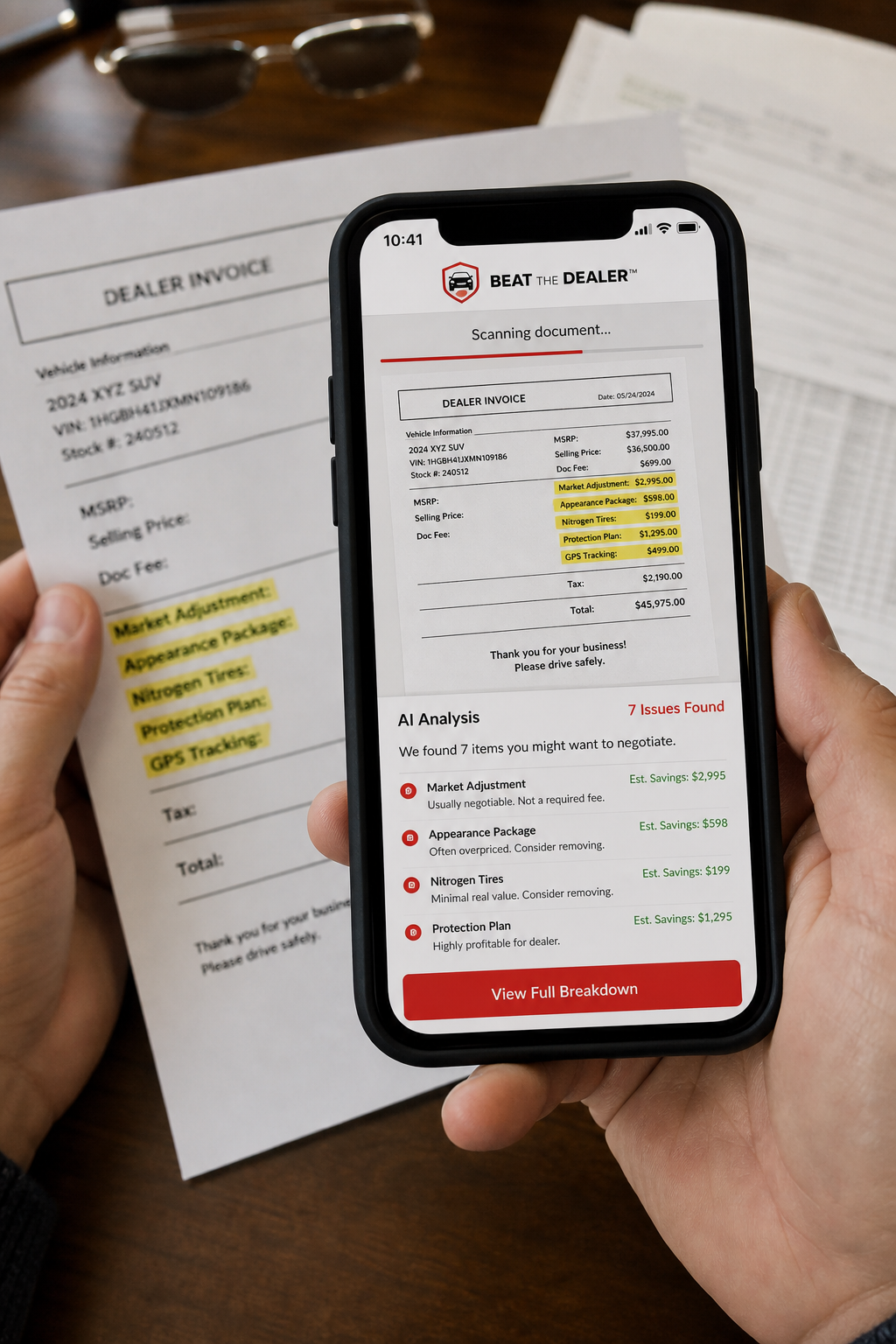
Beat the Dealer™ is a mobile app that uses AI to read a buyer’s order the second you snap a photo. It flags hidden line items, shows you the true market value of the VIN, and hands you word‑for‑word scripts to ask the dealer to drop or lower a charge. The app also scores each fee against state caps so you know if a “documentation fee” is illegal in your state.
Because the scanner works offline, you can use it at the lot, on a printed invoice, or on a digital PDF. It highlights anything that doesn’t match the invoice price you saw online, then tells you exactly what to say, no guesswork.
Best Tools to Reduce Dealer Fees Before Signing walk you through the same process step by step.
2. VIN Lookup Tool, Detailed Invoice and Market Report
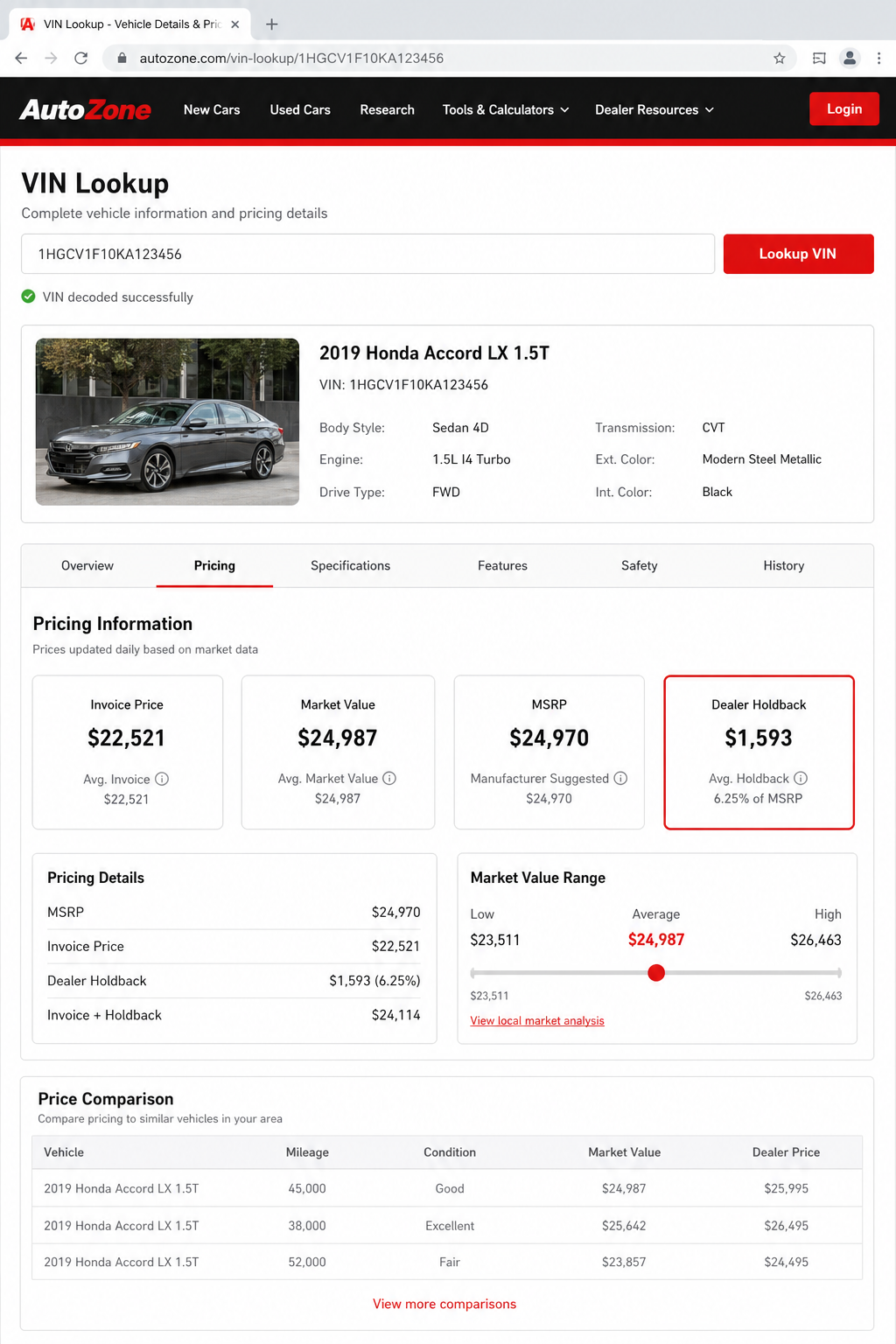
A VIN lookup tool gives you a full VIN‑based report that includes the factory invoice, destination charge, and any dealer holdbacks that reduce the true cost. The tool also shows how long the car has sat on the lot, which can be a bargaining chip for a price below invoice.
Enter the VIN, pick your trim, and the tool returns a market‑adjusted price range. Compare that range to the dealer’s out‑the‑door (OTD) quote and you instantly see if the dealer is padding the price.
For the definition of an invoice price and why it matters, see Wikipedia’s explanation of invoice pricing. The data is pulled straight from manufacturer records, so you’re looking at the dealer’s real cost.
3. Invoice Pricing Report, The Industry Standard for Invoice Pricing
Invoice pricing reports from industry sources publish the most trusted invoice data that dealerships use for internal pricing. These reports break down the base invoice, destination charge, and any regional adjustments.
When you pull such a report for the exact make, model, and trim, you get a clean number that you can quote at the desk: “I’m looking at an invoice of $27,800, can you meet that?” Dealers respect these recognized sources, so you’ll often see a quick concession.
Watch the quick walkthrough below for a live demo of how to pull an invoice pricing report and compare it to a dealer’s offer.
4. Fair Purchase Price Tool, Fair Purchase Price vs. Dealer Invoice
A fair purchase price tool blends dealer invoice data with real‑world market transactions. Their “Fair Purchase Price” shows the price most buyers actually paid for the same vehicle in your area, while the “Invoice Price” shows what the dealer paid.
Use this tool to spot a wide gap between the dealer’s OTD quote and the regional fair price. If the dealer’s price sits far above both, you have a strong case to ask for a reduction or walk away.
Combine the fair price from this tool with the invoice report from earlier and you’ve got a powerful two‑point reference.
5. True Market Value Tool, Real Dealer Invoice Data
A true market value (TMV) tool pulls dealer invoice numbers directly from manufacturer feeds. It also layers in real‑time rebates, incentives, and dealer holdbacks so the number you see is the most accurate estimate of the dealer’s cost.
Enter your zip code and vehicle details, and the tool will show a price range that reflects both the invoice and the typical market adjustments in your region. When the dealer’s quote falls outside that range, you can point to the TMV number and demand a fair price.
Best Mobile App to Audit Dealer Fees also mentions how such a tool fits into a full fee‑audit workflow.
6. Independent Cost Analysis, Independent Invoice and Ownership Cost Analysis
An independent cost analysis service runs its own invoice‑price research and adds an ownership‑cost calculator that factors in fuel, insurance, depreciation, and typical dealer fees. The report lets you see the total cost of ownership (TCO) versus the dealer’s out‑the‑door price.
Use the TCO table to argue that a higher invoice price will increase your monthly payment and overall cost. The report also highlights which fees are commonly “junk” and which are required by law.
7. State Attorney General Resources, Legal Backup for Fee Disputes
Every state’s Attorney General office posts PDFs that list the maximum allowed documentation fee, dealer prep caps, and what counts as a “legal” charge. If a dealer tries to charge beyond those caps, you can file a complaint directly with the AG.
For example, the California AG caps the doc fee at $199. If a dealer asks for $799, you can point to the official cap and demand the fee be reduced or removed.
These resources also explain which fees are considered deceptive under state consumer‑protection laws, giving you a legal lever if the dealer refuses to budge.
FAQ
What is the dealer invoice price and why does it matter?
The dealer invoice price is the amount the dealership pays the manufacturer for a vehicle, not including dealer profit. Knowing this number lets you see how much room there is for negotiation. If the dealer’s out‑the‑door quote is far above the invoice, you can push for a lower price or walk away.
How can I get a reliable invoice price for a used car?
Used cars rarely have a manufacturer invoice because they come from auctions or trade‑ins. Your best bet is to ask the dealer for the purchase price they paid, then compare it to market values from reliable online tools. If the dealer won’t share the number, use a VIN‑lookup tool to get a rough estimate.
Are documentation fees always illegal?
No. Documentation fees cover paperwork processing and are legal in all states, but many states cap the amount. Check your state’s Attorney General website for the exact cap. If the fee exceeds the cap, you can demand it be lowered or removed.
What should I do if a dealer adds a “market adjustment” fee?
Market adjustments are optional add‑ons that dealers use when demand is high. Ask the dealer to prove a real cost increase, such as a shortage of that model in your region. If they can’t, you can ask for the fee to be dropped or negotiate it down.
Can I rely on the numbers shown in the Beat the Dealer™ app?
Yes. Beat the Dealer™ pulls invoice data from official industry sources and combines it with live market values. The AI then flags any line that looks out of line with state caps or typical costs, giving you a clear picture of what’s legit.
How do I handle hidden dealer add‑ons that aren’t listed in the invoice?
Ask the dealer for a receipt for every add‑on. If they can’t produce one, you have the right to reject the charge. Use the negotiation scripts in Beat the Dealer™ to state, “I need a detailed receipt for this $425 dealer prep fee before I sign.”
Ready to stop junk fees from draining your wallet?Try Beat the Dealer™ free →
When you’ve gathered the invoice, market price, and legal caps, you have all the use you need. Use the tools above to cross‑check every number, call out any illegal charge, and walk away with a deal that reflects the true cost of the car. Your next step? Download Beat the Dealer™ to scan the buyer’s order, get live coaching, and lock in a fair price before you sign.